
Last updated on
Nov 6, 2026

Martha Stewart Wedding Workbook free printable template
We are not affiliated with any brand or entity on this form

Fill out
Complete the form online in a simple drag-and-drop editor.

eSign
Add your legally binding signature or send the form for signing.

Share
Share the form via a link, letting anyone fill it out from any device.

Export
Download, print, email, or move the form to your cloud storage.
Why pdfFiller is the best tool for your documents and forms


End-to-end document management
From editing and signing to collaboration and tracking, pdfFiller has everything you need to get your documents done quickly and efficiently.
Accessible from anywhere
pdfFiller is fully cloud-based. This means you can edit, sign, and share documents from anywhere using your computer, smartphone, or tablet.
Secure and compliant
pdfFiller lets you securely manage documents following global laws like ESIGN, CCPA, and GDPR. It's also HIPAA and SOC 2 compliant.
What is Martha Stewart Wedding Workbook
The Wedding Planning Workbook is a personal form used by couples to organize and plan their wedding effectively.
pdfFiller scores top ratings on review platforms




A lot easier to use than Adobe and a lot cheaper. I love that it allows me to do so much editing and saves as it goes
It's very useful for filling up PDF forms
YES
Great just perfect
So far, this is the easiest app I have encountered for filling fields on a pdf.
Very easy to use and professional.
Who needs Martha Stewart Wedding Workbook?
Explore how professionals across industries use pdfFiller.

Martha Stewart Wedding Workbook is needed by:
-
Couples planning their wedding
-
Wedding planners assisting clients
-
Families helping with wedding preparations
-
Event coordinators managing weddings
-
Friends or relatives involved in the planning process
-
Photography teams preparing for weddings
Comprehensive Guide to Martha Stewart Wedding Workbook
What is the Wedding Planning Workbook?
The Wedding Planning Workbook serves as a comprehensive tool designed to streamline the wedding planning experience for couples. Its primary purpose is to organize various aspects of a wedding, ranging from budgeting to establishing timelines. This workbook is particularly relevant for couples preparing to tie the knot, as it offers structured guidance through each phase of planning.
Purpose and Benefits of Using the Wedding Planning Workbook
Utilizing the Wedding Planning Workbook offers several significant benefits for effective wedding preparation. The workbook simplifies the planning process by providing structured worksheets that make it easier to manage tasks. It effectively supports couples in tracking essential elements such as expenses and guest information, ultimately enhancing wedding organization.
Key Features of the Wedding Planning Workbook
The Wedding Planning Workbook includes several key features that contribute to its utility:
-
Budgeting worksheets to monitor financial aspects.
-
Guest lists that allow for easy management of invitations.
-
A photography planning section to ensure memorable moments are captured.
-
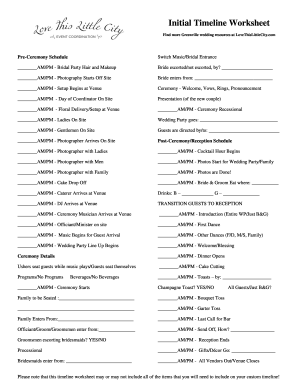
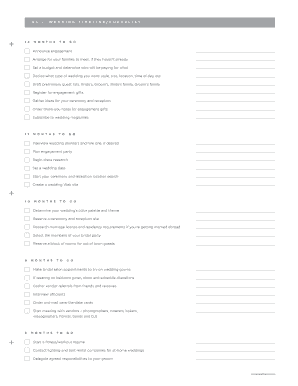
A detailed timeline outlining tasks leading up to the wedding.
-
Usability enhancements such as fillable fields and checkboxes for a tailored experience.
Who Can Benefit from the Wedding Planning Workbook?
The workbook is particularly beneficial for a range of users including engaged couples, event planners, and families participating in the wedding planning process. For instance, engaged couples can use this guide to create a comprehensive plan that addresses all their needs, while event planners can leverage its structured approach to manage multiple aspects efficiently.
How to Use the Wedding Planning Workbook Online (Step-by-Step)
Follow these steps to effectively utilize the Wedding Planning Workbook online:
-
Access the workbook through your preferred platform.
-
Fill out the sections in sequence, starting with the timeline for setting deadlines.
-
Utilize the budgeting worksheets to allocate resources properly.
-
Keep track of guest information using the guest list feature.
-
Review completed sections regularly to stay organized.
Common Errors When Completing the Wedding Planning Workbook and How to Avoid Them
Couples often encounter common mistakes while completing the Wedding Planning Workbook. Some key errors include underestimating budgets and neglecting to track important dates. To avoid these pitfalls, consider the following tips:
-
Ensure all fields are filled out completely.
-
Regularly validate information against the wedding timeline.
-
Implement a review checklist to confirm nothing is overlooked.
Importance of Security and Compliance for Completed Wedding Planning Workbook
Maintaining the security of wedding planning documents is essential. pdfFiller employs robust security measures, such as encryption and compliance with regulatory standards like HIPAA and GDPR, to safeguard your sensitive information. Users can feel reassured about the privacy and data protection safeguards in place as they manage their wedding-related documentation.
How to Save and Share Your Completed Wedding Planning Workbook
Saving and sharing your completed Wedding Planning Workbook is straightforward. Users can:
-
Easily download the workbook in preferred formats.
-
Print copies directly from their devices.
-
Share completed forms via various digital methods.
-
Utilize the eSigning feature for convenient document signing.
What Happens After You Complete the Wedding Planning Workbook?
After completing the Wedding Planning Workbook, the next steps involve implementing your carefully laid timeline. This includes managing and tracking expenses effectively while ensuring that guest information is up-to-date. Additionally, the workbook allows for revisions and updates as you progress in your planning journey.
Utilizing pdfFiller to Fill Out Your Wedding Planning Workbook
Users are encouraged to take full advantage of pdfFiller for their document management needs. This cloud-based platform enhances the experience of filling out the Wedding Planning Workbook, providing functionality and ease of use. The advantages of cloud-based editing and sharing capabilities streamline collaboration and finalization of wedding plans.
How to fill out the Martha Stewart Wedding Workbook
-
1.Begin by accessing the Wedding Planning Workbook on pdfFiller. Search for the form by name in the search bar or use the provided link to open it directly.
-
2.Once the document is open, navigate through the fillable fields. You can click on the areas where you need to input information, which will allow you to type in your responses easily.
-
3.Before you start, gather all necessary information, such as your budget, potential guests’ names, and photography preferences. Having this information ready will streamline the filling process.
-
4.As you fill out sections like the Budget Planner or Guest List Planner, make sure to complete all fields accurately. Utilize the checkboxes in specific areas to mark tasks as complete.
-
5.Review your inputs as you progress through the workbook. Ensure you don’t miss any sections and that all information is correct to avoid confusion later.
-
6.After completing the form, it's crucial to double-check everything. Go through the entire workbook, make any adjustments, and confirm all numbers and names are accurate.
-
7.To save your progress, click on the save icon to store your form on pdfFiller. You can also download it as a PDF for offline access or print it directly for physical use.
-
8.Finally, if you need to submit the document, check for any submission guidelines specific to your requirements. Use the submit option on pdfFiller if applicable.

Who can use the Wedding Planning Workbook?
The Wedding Planning Workbook is designed for couples planning their wedding, as well as wedding planners, families, and friends involved in the organization.
What is the best way to gather information before filling out the workbook?
Before starting the workbook, collect details such as your budget, guest list, and vendor information. This preparation will help you fill out the form accurately.
How can I submit the Wedding Planning Workbook once completed?
After filling out the workbook, you can save it on pdfFiller. If needed, download it or print it for physical submission, depending on the requirements.
Are there deadlines associated with using this workbook?
While the workbook itself does not have deadlines, it is recommended to follow a timeline for wedding planning to ensure all tasks are completed ahead of your wedding date.
What common mistakes should I avoid when using the workbook?
Ensure that all sections are completed and double-check entries for accuracy. Avoid rushing through the planning stages, as this can lead to oversights.
Can I edit the Wedding Planning Workbook after saving it?
Yes, you can reopen the saved document on pdfFiller and make any necessary edits or adjustments at any time before final submission.
Is help available if I have questions about using the workbook?
If you have questions about filling out the Wedding Planning Workbook, you can refer to pdfFiller's help resources or contact customer support for assistance.
Related Forms




Related Catalogs
Get the latest insights from our blog


If you believe that this page should be taken down, please follow our DMCA take down process
here
.
This form may include fields for payment information. Data entered in these fields is not covered by PCI DSS compliance.